
Every year on March 31, individuals and businesses around the world observe World Backup Day—a reminder that our digital lives are far more fragile than we think.
From family photos and financial records to business files and client data, everything we rely on daily can disappear in an instant due to hardware failure, cyberattacks, accidental deletion, or natural disasters. Yet millions of people still operate without a reliable backup plan.
If there’s one takeaway from World Backup Day, it’s this: data loss is not a matter of if, but when.
The Growing Risk of Data Loss
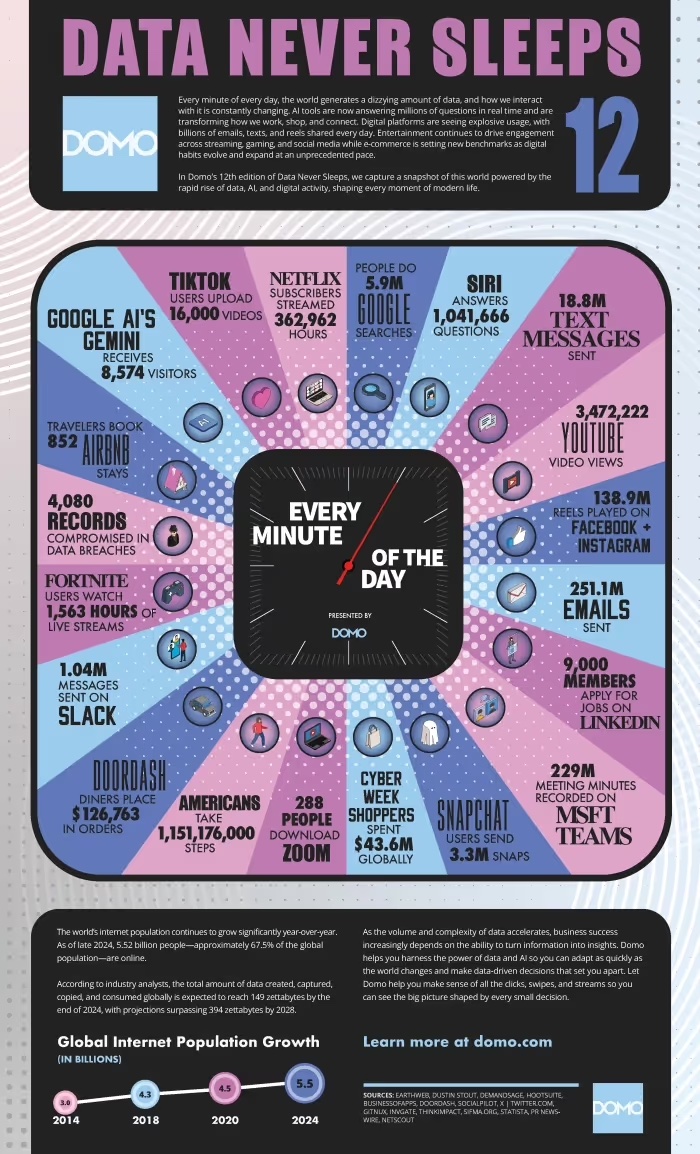
We are creating data at a feverish pace. Just consider some of the data created and used every minute, as reported in the latest Domo.com, Data Never Sleeps 12.0 report.
- Google conducts 5.9 million searches
- Siri answers 1,041,666 questions
- YouTube shows 3,472,222 videos
- Netflix users stream 362,962 hours of video
- 18.8 million text messages are sent
- 251.1 million emails are sent
Modern threats are evolving fast:
- Ransomware attacks can lock your files instantly
- Hard drive failures remain one of the most common causes of data loss
- Cloud sync errors can overwrite or delete files across devices
- Human error—accidental deletion or misplacement—is still a top culprit
Whether you’re a household user or running a business, losing data can be devastating—financially and emotionally.
What Is the 3-2-1 Backup Strategy?
The gold standard for data protection is the 3-2-1 backup strategy. It’s simple, practical, and highly effective.
Here’s how it works:
1. Keep 3 Copies of Your Data
- One primary copy (your working files)
- Two backup copies
This ensures redundancy—if one fails, you still have others.
2. Store Copies on 2 Different Types of Media
- Example:
- Internal hard drive (primary)
- External hard drive or NAS device
- Cloud storage
Using different media protects against a single point of failure. If your computer crashes, your external or cloud backup remains intact.
3. Keep 1 Copy Offsite
- Store at least one backup in a separate physical location
This protects against:
- Fires
- Floods
- Theft
- Local disasters
Cloud storage services make this easier than ever, automatically syncing your files to secure remote servers.
Why the 3-2-1 Strategy Works
The strength of the 3-2-1 approach lies in diversification and redundancy:
- Redundancy ensures you always have multiple recovery options
- Media diversity protects against hardware-specific failures
- Offsite storage guards against catastrophic events
It’s a layered defense system for your most valuable digital assets.
Real-World Example
Imagine this scenario:
- Your laptop crashes (primary copy lost)
- Your external hard drive was recently damaged
- But your cloud backup is intact
Because you followed the 3-2-1 rule, you recover everything with minimal disruption.
Without it? Total loss.
Getting Started: A Simple Backup Plan
You don’t need enterprise-level tools to protect your data. Here’s a simple setup:
- Primary device: Your computer
- Local backup: External hard drive (automatic daily backups)
- Offsite backup: Cloud service (continuous sync)
Set reminders, automate where possible, and test your backups regularly.
Common Mistakes to Avoid
Even people who back up data often make critical errors:
- ❌ Only using one backup location
- ❌ Never testing backups
- ❌ Relying solely on cloud sync (not true backup)
- ❌ Forgetting to back up mobile devices
A backup is only useful if it works when you need it.
The Bottom Line
World Backup Day isn’t just a symbolic reminder—it’s a call to action.
The 3-2-1 backup strategy offers a simple, proven framework that anyone can implement. Whether you’re protecting personal memories or mission-critical business data, taking the time to build a backup system today can save you from a catastrophic loss tomorrow.
Don’t wait for a data disaster to realize the importance of backups.
If you liked this article, please consider sharing it with your friends and leaving a comment below. Also, don’t forget to “Like” us on Facebook and add the Apple Tech Talk channel to your Apple News app.
Apple Tech Talker




Leave a Comment
You must be logged in to post a comment.